What Is Claude Code & How It Works on the CLI
Most AI coding tools are autocomplete: you type, they suggest, you accept. Claude Code is different in kind — it is an agent. You give it a goal in plain English, and it works toward that goal across multiple steps, using tools to read your files, run commands, and make edits. Understanding that loop is the key to using it well.
The REPL: where you work#
When you run claude in a project, you get an interactive prompt — a REPL (read-eval-print loop). You type a request, Claude works, you see the result, and you type the next request. The conversation builds up over the session: Claude remembers what you discussed earlier in that session and what it has already done.
You talk to it in ordinary language. There is no special command syntax for normal requests — "add input validation to the signup form" is a complete instruction.
The agentic loop#
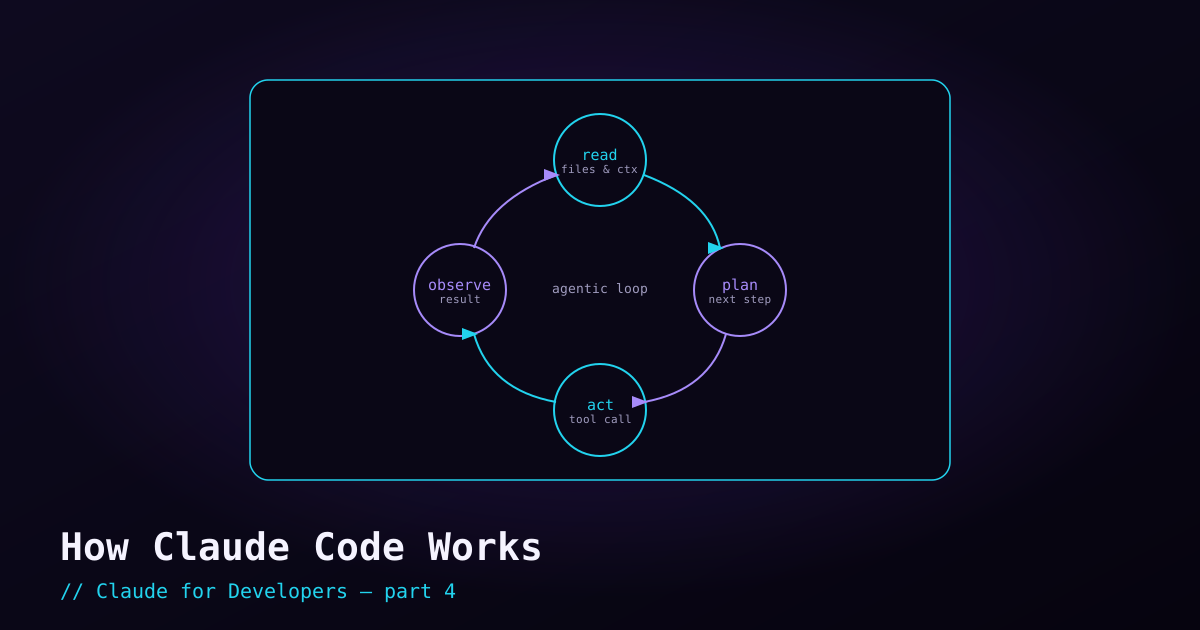
When you give Claude Code a task, it runs a loop under the hood. Roughly:
- Read — it gathers context: searching your files, reading the relevant ones, running read-only commands to understand the situation.
- Plan — it decides what to do, often in a series of steps.
- Act — it takes an action: editing a file, running a command, calling a tool.
- Observe — it looks at the result (the command output, the test result, the error) and decides what to do next.
Then it repeats — act, observe, act, observe — until the task is done or it needs your input. This is why it can do things autocomplete cannot: it can run your tests, see a failure, fix the cause, and run them again, all in one turn.
The context window#
Everything Claude is "thinking about" — your instructions, the files it has read, the command output it has seen, the project memory (more on that next post) — lives in its context window. Think of it as the model’s working memory for this session.
The window is large but not infinite. Two practical consequences:
- Over a long session the context fills up. Claude Code manages this automatically (summarizing older parts when needed), so you rarely have to think about it — but it is why a very long session can feel like it has "forgotten" early detail.
- You can check what is using context with the
/contextcommand, and start fresh with/clearwhen you switch to an unrelated task. A clean context for a new task keeps Claude focused.
Steering: you are the driver#
You are not locked out while Claude works. You can interrupt and redirect at any time:
- `Ctrl+C` — interrupt what it is doing. Then tell it what to do differently; it picks up with your new direction.
- Just type — when Claude is waiting, give your next instruction or a correction. "No, use the existing helper instead of writing a new one" is a perfectly good steer.
- Be specific up front — the clearer your initial request (what, where, and any constraints), the better the first attempt. Vague asks lead to more back-and-forth.
Treat it like pair-programming with a fast junior developer: give clear direction, watch what they do, and correct course early rather than letting them run far in the wrong direction.
Permissions: it asks before doing risky things#
By default, Claude Code does not silently run dangerous commands or make sweeping changes without surfacing them. It asks for approval at sensible points, and you control exactly how much freedom it has. That balance — autonomy vs. control — is important enough that it gets its own post next.
The mental model to keep#
Claude Code is an agent that loops — read, plan, act, observe — using tools inside your project, holding the task in a context window, and steerable by you at any moment. Everything else in this series is built on that one idea.
What’s next#
Now that you know it can act on your machine, the natural next question is: how much should it be allowed to do on its own? The next post covers permissions and staying safe — permission modes, allow/deny rules, and how to let Claude move fast without worry.